PayPal Stored XSS using XML file upload
Hey Guys,

Today I’m going to share one of my interesting Stored XSS vulnerability found on PayPal Site using XML file upload.

PayPal allows the users to create an invoice and send to the other users. Also allow attaching the file into invoice. So I started trying to upload file with different types of extensions and found that PayPal allows users to upload XML formatted file.

So the next steps I tried for XXE vulnerability but no luck which makes me happy. After couple of test cases I applied, but not found any interesting things to make this vulnerable.

I noticed that if we upload XML file with script tag, which is working perfectly.

<?xml version="1.0" encoding="UTF-8"?>
<Query>
   <SearchTerm>
      <script xmlns="
http://www.w3.org/1999/xhtml">
          alert(document.cookie);
      </script>
   </SearchTerm>
</Query>


Now next steps to exploit!

The exploitation of the bug is very easy. In order to does this attack, create an invoice with xml file and send to victim. When victim open the attached xml file, the script run into his/her browser.


I reported to PayPal security team and the bug was valid. After the fix PayPal team rewarded me with Bounty under PayPal BugBounty program.


Thanks.


Bypass Google Drive iOS App Passcode using runtime Analysis
Recently I was working on runtime analysis of iOS applications and found that there is way to bypass passcode by hooking into the application runtime, access & modify the instance variables, invoke the instance methods and override the existing methods.

So i started looking for bugs in google iOS applications soon I found that google drive uses a security passcode. once the passcode is set, whenever the app is launched it prompts for the passcode. So this passcode lock can be bypassed by manipulating the iOS runtime with cycript.

Before moving into runtime, I have quickly decrypted the app using clutch and obtained the class information using class-dump.

So now connected to the iPhone over SSH and Launch the Google Drive app and set passcode into Google Drive and also set as Always lock.


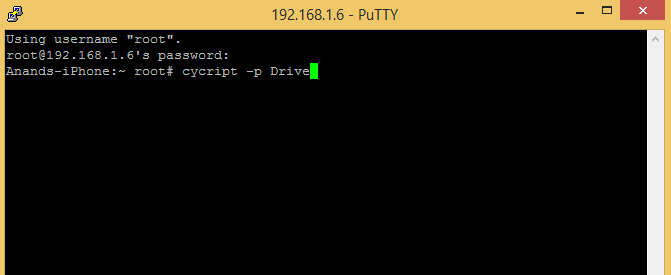
Attached Drive process to cycript and obtained the view controller instance.


The app should be sitting at the lock screen so finding out the controller that is current at the time as this is the one will want to manipulate.


The last line we now know the name of the lock screen view controller is “GDAPasscodeVC”. This is the one we will want to look into.

Looked at the class dump for GDAPasscodeVC interface for interesting methods/variables and noticed an interesting method userWasAuthenticated


I created a variable named testing to the current ViewController. This is just to make things easier for the future use. You can alternatively just type the following to get the current ViewController.

Cy#testing=UIApp.keyWindow.rootViewController.visibleViewController

Cy#[testing userWasAuthenticated]


When Invoking the userWasAuthenticated method directly from the the cycript prompt, its logged me into the app.

This is one thing we can do with runtime analysis. Typically we can manipulate the runtime to break logic checks, escalate privilege or steal information memory.

Video Demonstration :


Remediation : 
We can add an extra parameter to the function that might prevent it invoking from cycript but its not a fully mitigation to protect bypassing passcode reasoning behind this is that it's practically impossible to protect the application against the attacker who can run code within the process of that application (which is what we are doing by attaching a debugger).

The best way to prevent these types of attack is the server side validation. The server side validation is the proper way to protect users from these types of attack.


Password Reset Vulnerability
Hi guys !

Today I am going to share some of my findings on password resetting vulnerability which I found recently.

So while testing mostly I start with login and password resetting functionality. These two functionalities are very critical in any application. If you bypass login functionality you can take over the account and sometime by using password reset functionality you also can compromise an account. So both of these functionalities are very crucial for pentesting and application security.

While testing most of the sites I found that they implement login mechanism and password functionality properly but some time due to some poor logic or minor flow error it can be vulnerable. So always analyze login and password reset functionality and think what you could do to exploit these using logical flaws. Sometime the exploitation process is not so easy and some other time it can be done in easy way.

So let’s start with the Password reset vulnerability I found when performing a pentest. I started looking into application which appeared nice (because it was a dating site :) ). I explored all the functionalities  and understood the application work flow which helped me in finding vulnerabilities. Then I focused on the login mechanism. I tried some test cases for authentication bypass but FAILED :(

Now what ?

I asked myself do I need to start testing for common flaws like SQLi,XSS,CSRF ? No
I thought of giving them a try after sometime.

Moving on password reset page. And started analyzing it.
When I visited password reset page it asked me to enter email or user id which is quite common thing in such page and I did enter the email id and got the password reset token in my mail. (I already had an account for testing that site)

After that  I used that token link and reset my password ,everything worked fine and password was successfully changed.

Then I started analyzing the password reset token link that I got clicking on the link provided in the mail. It look quite the same as shown below.

https://site.com/token=7c8bab06c29d8264e391d317744b17e0&lang=US

I realize that token parameter value is looking like hashed with MD5. I Started decrypting but unable to do the same.

I collected  more tokens and analyzed but did not get anything interesting.

While analyzing suddenly I found that two types of token links were being used, one was when they are sending token on mail (as i mentioned above) and another was when I was using token as shown below

https://site.com/qw_email/link/ac=VG5wTk1FNVVXVE5OVkd0M1RtcFJlZz09&req=21

So now I had two token links

first : https://site.com/qw_email/link/ac=VG5wTk1FNVVXVE5OVkd0M1RtcFJlZz09&req=21 (what i got in my mail )

second : https://site.com/token=7c8bab06c29d8264e391d317744b17e0&lang=en (what i got after clicking the above link)


Second token was impossible to decrypt !


Now looking into first token which was in my mail. I found that it was not looking like it is Hashed.
It was something else.

So I tried to decode it with different decoding techniques but I did not get anything interesting. But after sometime i decode the same with base64 contenuously and after some attempts finally I found some numeric value. :)


Now it's time to understand about numeric value.

Earlier when I was trying to understand about application workflow, I found that the user id value they are using  is numeric, so immediately I opened my profile and matched that numeric value and yeah ! that value was same.

So I found that 'ac' parameter is having user id value with thrice base64 encoded.

From my analysis what I got was , when user click on "Reset your password now".First token was send to the email id which contains ac parameter value (the encoded form of userid) and a req parameter. By clicking on that link it requests for second token from server side by validating user id which is there in the first token to get the reset password form.


I needed to cross check it with another user account.So I created another account and note down the user id value, then encoded it thrice using base64.

Victim UserId = 562199544561
Encoded = VGxSWmVVMVVhelZPVkZFd1RsUlplQT09

Then crafted a password reset token which looks as follows:

https://site.com/qw_email/link/ac=VGxSWmVVMVVhelZPVkZFd1RsUlplQT09&req=55

By using this link I was able to reset the password for other user account. Similarly i just need to enumerate the userid (which was possible in that application) then request a password reset in my own account. After getting the password reset link change the ac parameter value to the thrice base64 encoded value of victim account or the account I enumerated. By clicking on the link it will provide me the password reset form to takeover the victim account.


This is just an interesting logical flaw that allowed me to compromise victim account using password reset functionality. I will share other interesting scenarios what I met while pentesting soon.
Powered by Blogger.